Your customers message everywhere. Your team replies from one place.
InboxPulse is a unified team inbox for WhatsApp, Facebook Messenger, Instagram direct messages, and website live chat. Your whole team answers every customer from one dashboard, with AI reply suggestions, smart assignments, broadcast campaigns, an auto-responder, and live analytics. It is built in Bangladesh for businesses that measure customer messages in the hundreds per day.
Free to start, with no credit card required. Paid plans are paid by bKash, and your account is activated within twenty four hours of the payment being verified.
- 4Channels in one shared inbox
- 3AI replies drafted per message
- 5 minTo connect Messenger or Instagram
- ৳0To start, on the free plan
One inbox for every channel your customers use.
Every channel below arrives in the same inbox, handled by the same team, with the same assignments, labels, and analytics.
Connect the WhatsApp Business number your customers already message. You do not need a new number, and your existing conversation history stays where it is.
Facebook Messenger
Any Facebook Page connects in a few minutes. Messages from your Page land in the same inbox as everything else, and your team replies without leaving InboxPulse.
Instagram direct messages
Connect an Instagram Business or Creator account that is linked to your Facebook Page. Story replies and story mentions are labelled clearly, so agents keep the context.
Website live chat
Paste one line of code before the closing body tag of any website. Visitors chat with your team directly on the page, and you can offer to continue on WhatsApp afterwards.
And where they review you:
Google Reviews
Connect your Google Business Profile to see every review as it arrives, with an AI draft reply ready to approve and publish back to Google.
Facebook Reviews
Your Page's recommendations land in the same Reviews dashboard, using the Facebook connection you already have for Messenger.
And what your website is doing:
Website analytics
Connect your Google Analytics 4 property to read visitors, traffic sources, top pages, and devices beside your conversations, with an AI note under every chart explaining what changed.
WhatsApp requires a Meta WhatsApp Business API setup, which takes about fifteen to twenty minutes and is guided step by step inside the app. Facebook Messenger and Instagram connect through your existing Facebook Page without any API approval process. The website chat widget needs one line of code and no technical setup at all.
The problem every growing business hits.
These are the three failures we hear described almost word for word, by business after business, before they move to a shared inbox.
One phone, one person
Your team has five people, but only one of them can see the messages. While that person is serving a customer, driving, or asleep, every other message simply waits. Orders are missed and customers quietly go elsewhere.
No visibility for managers
You have no reliable way to know which messages were answered, which were missed, or how long anyone waited for a reply. Every morning starts with a guess instead of a number.
Manual workarounds
Your team forwards messages into internal groups, takes screenshots, and writes order details in a notebook. There is no history, no ownership, and nothing to review when a customer says nobody ever replied.
Work it through for your own business. If thirty messages a day go unanswered and one in ten would have become an order worth five hundred taka, that is fifteen hundred taka lost every day, or roughly forty five thousand taka a month. Most owners we speak to have never counted it, because there was never a system that could.
From message to reply, in seconds.
This is exactly what happens from the moment a customer messages you, whichever channel they use.
Connect your channels
Connect your WhatsApp Business number, your Facebook Page, your Instagram account, or your website chat widget. You can start with one and add the rest later.
A customer sends a message
They message you the way they always have, on whichever platform they already use. Nothing changes for them.
InboxPulse receives it immediately
The message lands in your shared inbox within seconds, visible to every agent, tagged with the channel it arrived on.
AI drafts three replies
Google Gemini reads the whole conversation and suggests three replies your agent can send as they are or edit first.
AI writes the conversation summary
Any agent can open a long thread and understand it immediately, without reading back through weeks of messages.
Your agent replies
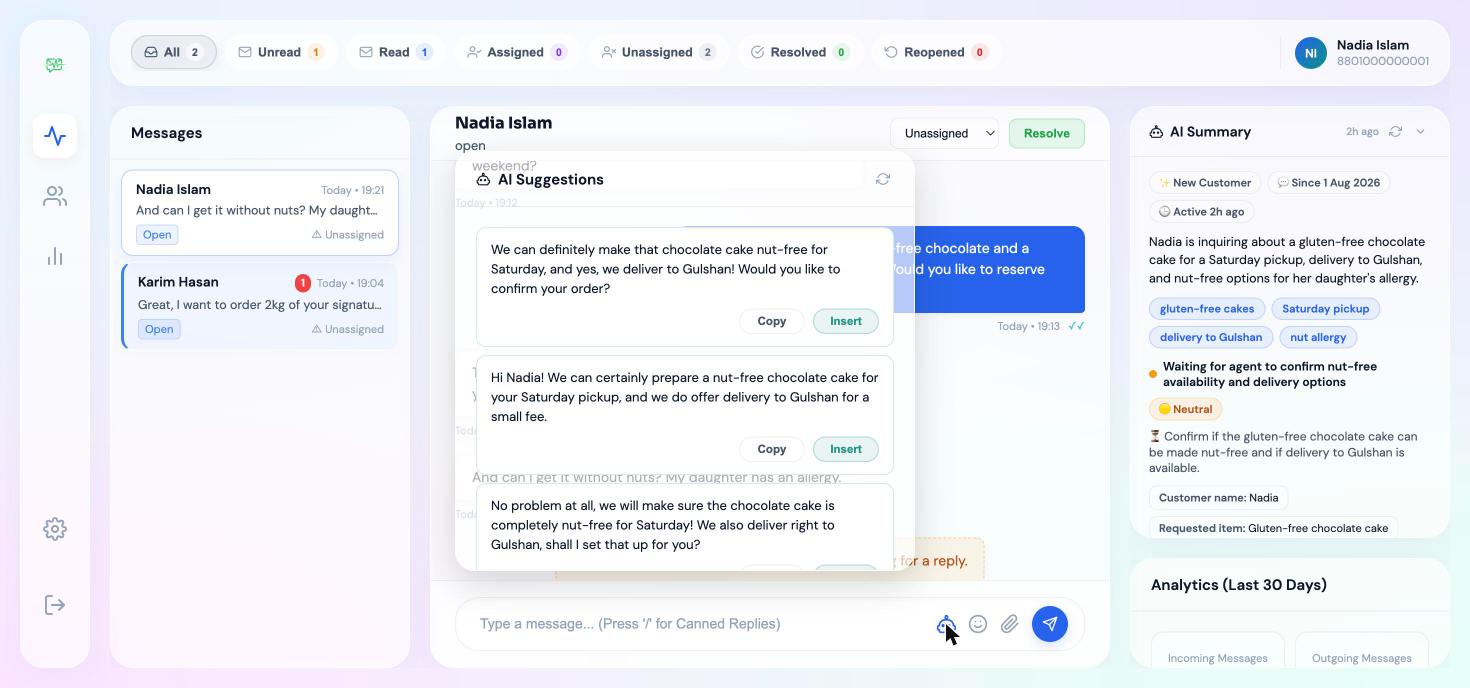
One click inserts a suggestion. The agent adjusts it if the customer deserves something more specific, then sends it back down the same channel.
Analytics update in real time
Response times, resolution rates, and AI usage all tick up live on your dashboard.
How InboxPulse works.
Four steps take a customer message from arriving to resolved, whichever channel it came in on.
A customer messages your business
Someone writes to you on WhatsApp, Facebook Messenger, Instagram, or the chat widget on your website. The message reaches your InboxPulse inbox within seconds, and which channel it arrived on is shown clearly on the conversation.
Your whole team sees it immediately
Every agent sees every new conversation in the shared inbox, from any browser on any device. Nobody forwards a screenshot or waits for one person to wake up, and if two agents open the same conversation, both are warned before they reply twice.
AI drafts the reply
Google Gemini reads the conversation and suggests three replies the agent can send as they are or edit first. For a long thread, the AI summary explains what the customer needs without anyone scrolling back through weeks of messages.
Assigned, tracked, and resolved
The conversation is assigned to one agent so ownership is never ambiguous, and it stays on the analytics dashboard until it is resolved. Managers can see response times, who replied, and what is still waiting, at any point in the day.
Everything your team needs to manage customer conversations.
Every feature below exists because a real business described the problem it solves.
AI reply suggestions
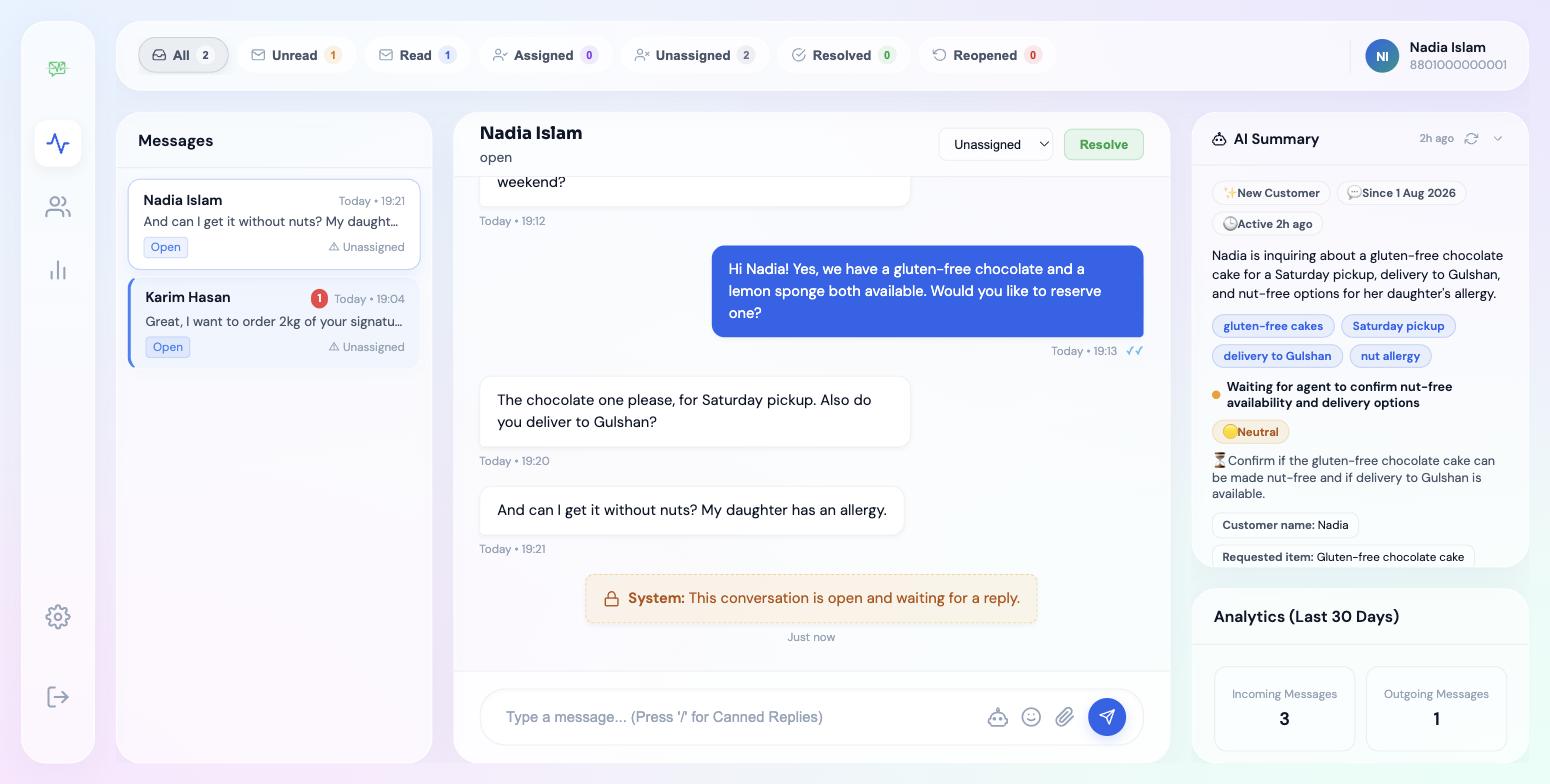
Google Gemini reads the conversation and drafts three context aware replies in a few seconds. Your agent picks one, edits it if the customer deserves something more specific, and sends. The judgement stays human while the typing does not.
AI conversation summary
Opening a thread with sixty messages in it used to mean reading sixty messages. The summary explains in plain English what the customer has asked for, what has already been promised, and what to do next.
Shared team inbox
Several agents work the same WhatsApp number, Facebook Page, Instagram account, and website chat from one dashboard. Every conversation is visible to everyone who should see it, from any browser.
Smart assignments
Any conversation can be assigned to a specific agent in one click, so ownership is never ambiguous. The assigned agent is notified, and the assignment is visible to the whole team and on the analytics dashboard.
Collision detection
When two agents open the same conversation, each of them sees who else is there and whether that person is typing. This is the most common way a shared inbox embarrasses a business, and it is prevented rather than reported afterwards.
Broadcast campaigns
Send an approved WhatsApp template to hundreds of contacts in one campaign, then track how many were delivered, read, and replied to. Replies land back in the normal inbox as ordinary conversations.
Auto-responder
Choose a delay of two, five, ten, or fifteen minutes. If no agent has replied by then, InboxPulse sends an acknowledgement so the customer knows they have been heard rather than ignored.
Business hours replies
Set the days and hours you actually work. A customer who messages at midnight gets a different, honest reply telling them when you will be back, instead of silence until morning.
Real time analytics
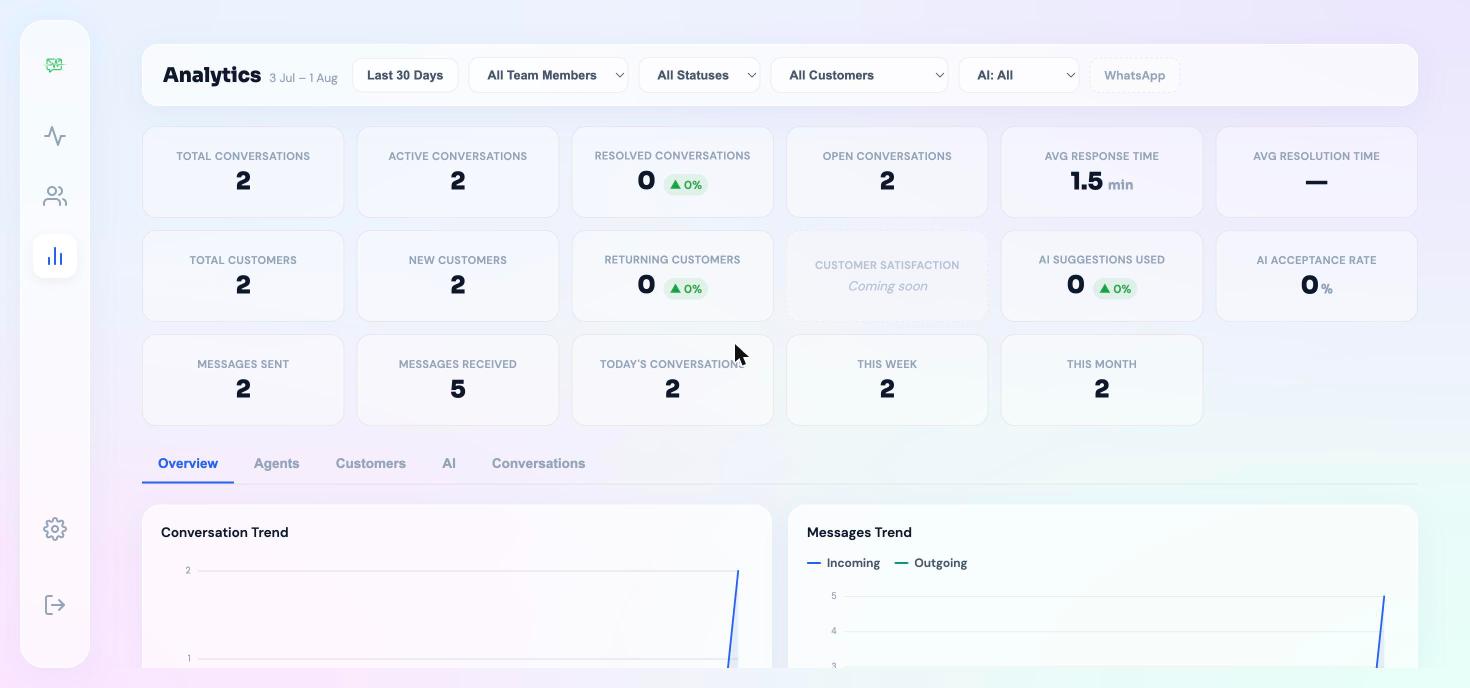
Track response times, first reply times, conversation volumes, busiest hours, and how each agent is performing. Managers get numbers instead of impressions, and the dashboard updates as the day happens.
Website analytics
Connect your Google Analytics 4 property and read your website the same way you read your inbox — visitors, traffic sources, top pages, device breakdown, and engagement — without opening another tab. AI writes a plain English note under every chart explaining what changed and why it matters.
Canned replies
Save the answers your team types every day and insert them with a keyboard shortcut. The replies are shared across the team, so every agent answers the same question the same way.
Labels and filtering
Tag conversations with your own labels, such as order, complaint, VIP, or wholesale, then filter the inbox by any of them. Finding every unresolved complaint takes one click rather than a scroll.
Internal notes
Leave private notes on a conversation that the customer never sees. Brief the colleague taking over, record what was agreed on a phone call, or flag something for the manager to look at.
Contact management
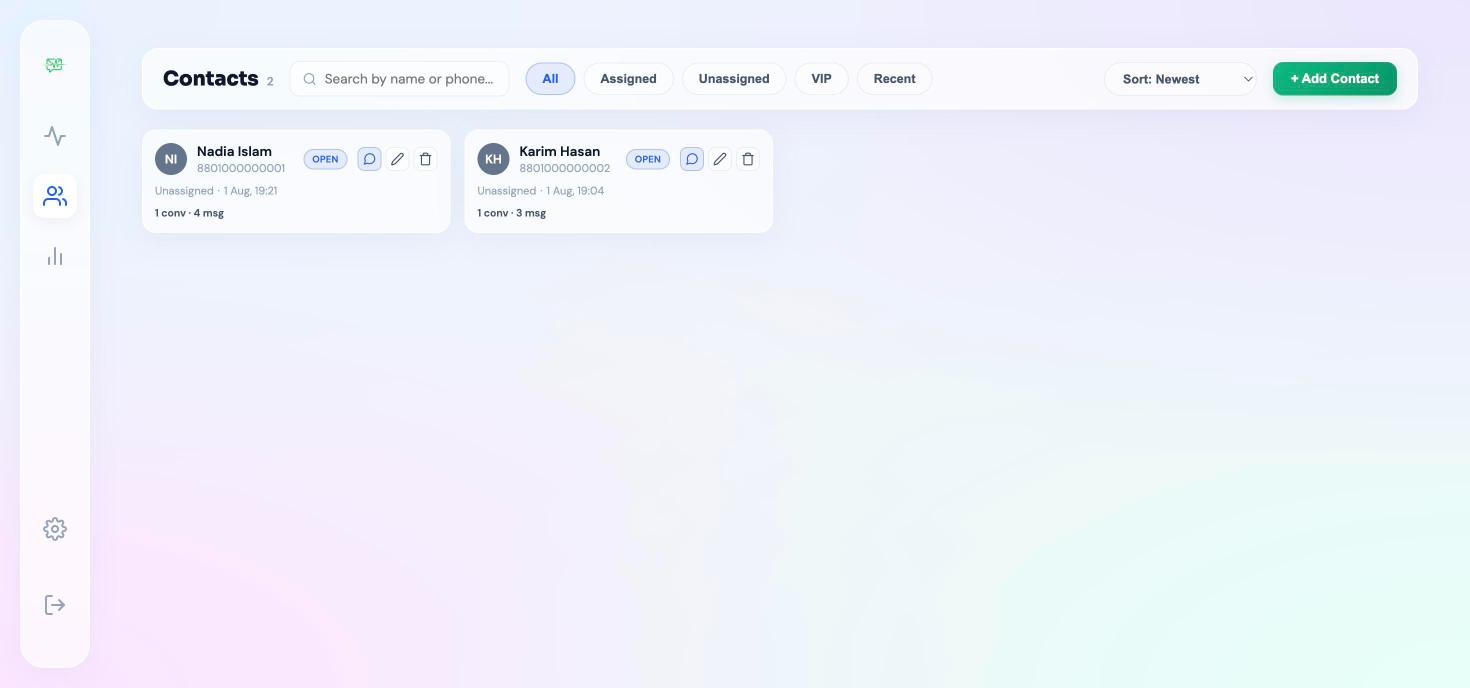
Every customer is saved automatically with their conversation history, contact details, labels, and notes. An agent picking up a thread can see what was discussed last month before they reply.
Website chat widget
One line of code puts a chat button on any website. Visitors talk to your team on the page, and if you turn the option on, they can carry the same conversation on to WhatsApp when they leave.
WhatsApp templates
Create, submit, and manage WhatsApp message templates inside InboxPulse, with variables and a live preview. Approval status comes straight from Meta, so you always know what you are allowed to send.
Roles and permissions
Owners control billing and everything else. Admins run the workspace day to day. Agents see the inbox and contacts they need and nothing more, so access matches responsibility.
Connection health checks
InboxPulse checks your WhatsApp connection every fifteen minutes and shows a clear warning the moment a token expires or credentials break, rather than letting messages fail silently for a week.
Team management
Invite colleagues by email, set their role, deactivate someone who has left, and see when each person was last active. Adding a seasonal agent takes a minute and removing them takes less.
AI Review Manager
Connect your Google Business Profile and Facebook Page to see every customer review in one dashboard. AI reads each one and drafts a reply in your business's voice. Your agent edits if it needs it and publishes back to the platform in one click.
See the real product.
No mockups. These are live features of InboxPulse today.
Built for businesses that live in their inbox
Two hundred orders a day arriving on a single phone, with staff taking turns to hold it. A shared inbox lets three people work the same queue without answering the same customer twice or losing an order in the scroll.
Restaurants and cloud kitchens
High order volume, one number
Appointment requests arrive all day and each one needs the same handful of answers. AI reply suggestions draft the response and the agent sends it, so booking stops depending on who happens to be free.
Clinics and appointment booking
Repetitive questions, fast turnaround
"Where is my parcel?" is most of the inbox. Canned replies and a shared queue mean whoever is free can answer it, instead of the one colleague who knows where to look.
Courier and delivery services
The same question, hundreds of times
Simple pricing. Start free today.
There are no long contracts and no setup fees. You can move between plans or stop at any time.
Free
Try InboxPulse with one agent on the channel of your choice.
- ✓ 1 agent
- ✓ 1 channel of your choice
- ✓ 50 AI reply suggestions per day
- ✓ 500 conversations per month
- ✓ 10 canned replies
- ✓ 7 days of analytics history
- ✓ Community support
Starter
For a small team that needs automatic replies outside business hours.
- ✓ Up to 2 agents
- ✓ Any 2 channels
- ✓ 100 AI reply suggestions per day
- ✓ 2,000 conversations per month
- ✓ 25 canned replies
- ✓ 14 days of analytics history
- ✓ Auto-responder and business hours replies
- ✓ Email support
Growth
For growing teams that need every channel, unlimited AI and broadcast campaigns.
- ✓ Up to 5 agents
- ✓ All 4 channels
- ✓ Unlimited AI reply suggestions
- ✓ Unlimited conversations
- ✓ Unlimited canned replies
- ✓ 30 days of analytics history
- ✓ Auto-responder and business hours replies
- ✓ Broadcast to up to 1,000 contacts
- ✓ Email support, with InboxPulse branding removed
Business
Unlimited scale across every channel and multiple WhatsApp numbers.
- ✓ Unlimited agents
- ✓ All 4 channels
- ✓ Up to 3 WhatsApp numbers
- ✓ Unlimited AI reply suggestions
- ✓ Unlimited conversations
- ✓ 90 days of analytics history
- ✓ Unlimited broadcast contacts
- ✓ Priority support
Meet the Founder

Md Alqurayish Sharkar
Md Alqurayish Sharkar is an AI Product Engineer, and the founder of InboxPulse, a shared team inbox for WhatsApp, Facebook Messenger, Instagram, and website chat. He is also director of D-SAI (ScanRoster Ltd.), and works between Southampton in the United Kingdom and Dhaka in Bangladesh.
He started building InboxPulse after a restaurant owner showed him a phone with forty seven unread WhatsApp messages at eleven in the morning. The owner was in the kitchen, his staff had no way to see any of those messages, and orders were being lost every hour he stayed there. The problem was not that the business lacked people. It was that only one person could reach the conversations.
InboxPulse is built on the official Meta WhatsApp Cloud API with Google Gemini for its AI features. Every feature in it came out of a conversation with a business that was already struggling, rather than from a roadmap written in advance, which is why the product is unusually specific about problems like two agents replying to the same customer at once.
Frequently asked questions.
Everything worth knowing before you connect your first channel.
A shared team inbox lets several people answer the same customer conversations at the same time, instead of every message arriving on one person's phone. Your team sees the same inbox from any browser, conversations can be assigned to a named agent, and a manager can see what was answered and what is still waiting. InboxPulse is a shared team inbox for WhatsApp, Facebook Messenger, Instagram direct messages, and website live chat.
No. InboxPulse connects to the WhatsApp Business number you already use, so your customers keep messaging the same number they always have. Meta also offers a coexistence mode that lets you keep using the WhatsApp Business App on your phone while your team works the same conversations inside InboxPulse.
Yes. The Free plan is permanent and includes one agent, one channel, fifty AI reply suggestions per day, up to five hundred conversations per month, ten canned replies, and seven days of analytics history. No credit card is required to start. Paid plans begin at 1,500 taka per month, which is about fifteen US dollars.
InboxPulse supports the WhatsApp Business API, Facebook Messenger, Instagram direct messages, and a website live chat widget. Every channel arrives in the same inbox and is handled by the same team, with the same assignments, labels, notes, and analytics. WhatsApp needs a Meta WhatsApp Business API setup. Facebook Messenger and Instagram connect through your existing Facebook Page without any API approval process, and the website widget is one line of code.
Yes. InboxPulse is built for businesses that receive a high volume of customer messages, which in Bangladesh usually means restaurants, F-commerce sellers, clinics, diagnostic labs, courier companies, salons, and coaching centres. Pricing is in Bangladeshi Taka, payment is by bKash, and the product was designed around how these businesses actually work rather than adapted from a Western tool.
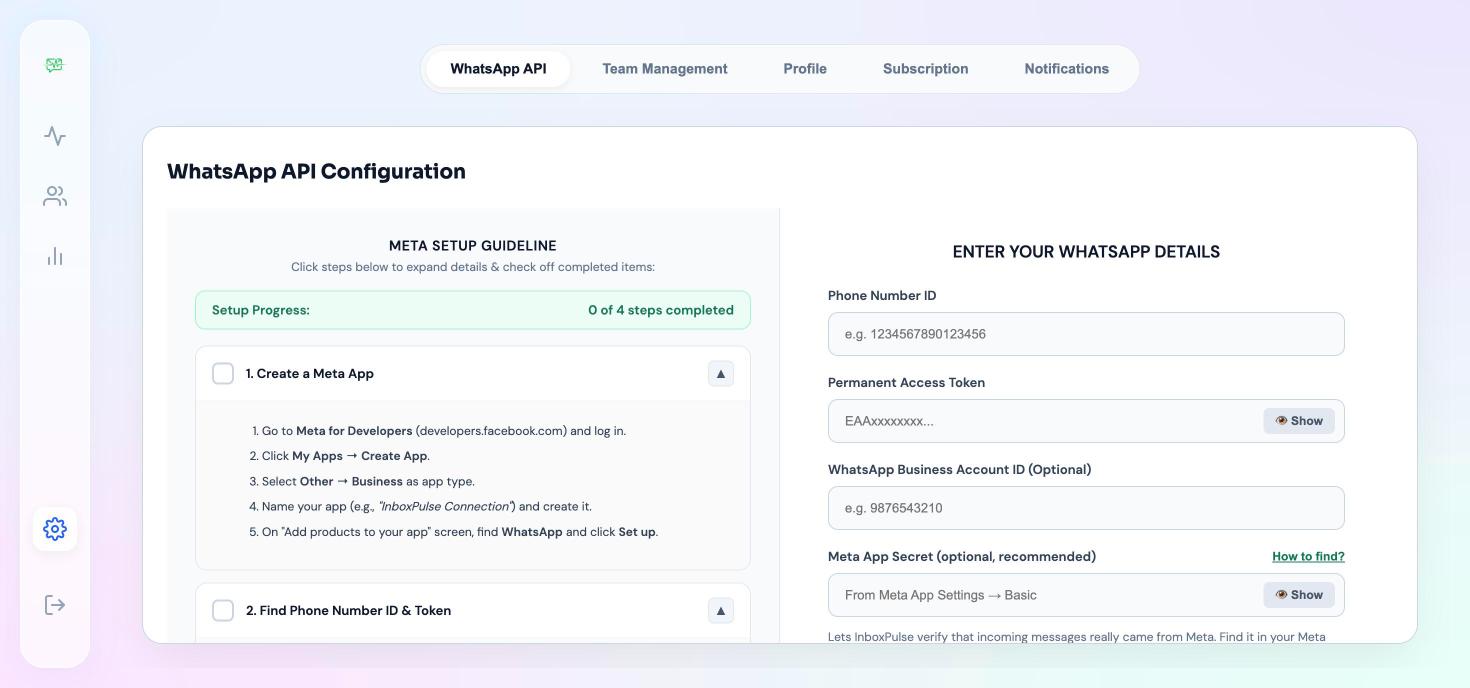
Register at inboxpulse.d-sai.com, then open Settings and go to Channels. The guide inside the app walks you through creating a Meta developer app, adding the WhatsApp product, copying your Phone Number ID and permanent access token, configuring the webhook, and testing that a real message arrives. Most people finish in fifteen to twenty minutes. Facebook Messenger and Instagram are considerably quicker because they connect through your Facebook Page.
Meta allows free-form replies for twenty four hours after a customer's last message. Once that window closes, InboxPulse shows a clear notice in the conversation and switches you to approved template messages, which are the only thing Meta permits at that point. As soon as the customer replies to your template, the twenty four hour window reopens and normal messaging resumes automatically.
Yes, two of them, both powered by Google Gemini. AI reply suggestions read the conversation and draft three replies your agent can send as they are or edit first. The AI conversation summary reads a long thread and explains in plain English what the customer has asked for and what to do next, so an agent picking up someone else's conversation does not have to read forty messages to understand it.
Ready to get started?
Create your workspace, connect a channel, and invite your team. You can be answering customers from a shared inbox today, and you do not need a card to begin.
Start free todayGet in Touch
Have a question or want to learn more? We would love to hear from you.